
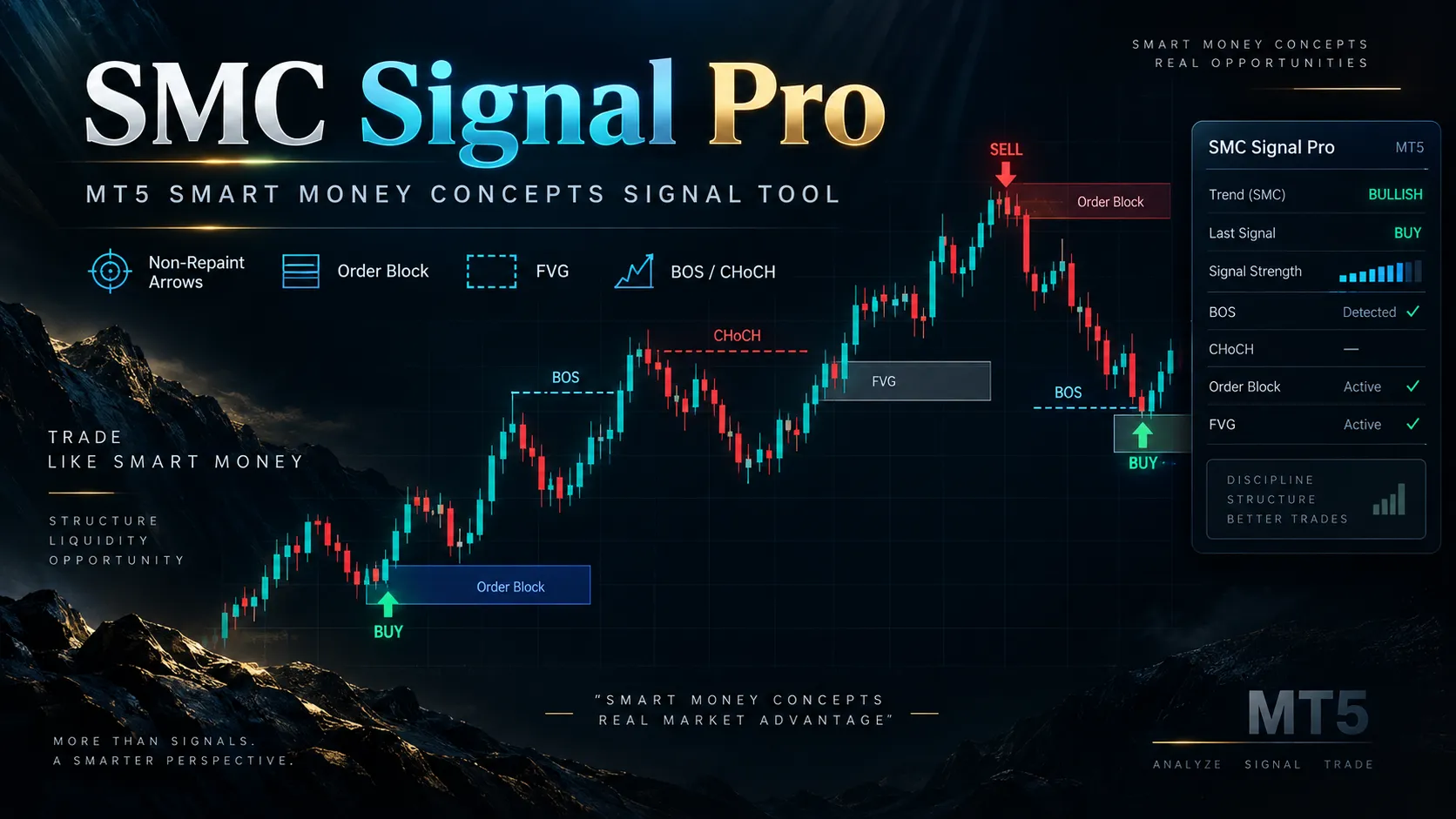
SMC Signal Pro is a MetaTrader 5 indicator that uses Smart Money Concepts (SMC) to identify potential entries. It marks changes in market structure, order blocks and fair value gaps (FVGs) directly on the chart.
When its conditions are met, the indicator draws a BUY or SELL arrow and can display suggested entry, take-profit (TP) and stop-loss (SL) levels. A dashboard shows the current trend and the most recent signal.
Signal arrows are calculated on closed candles. Once an arrow is confirmed, the indicator does not move or remove it. This lets you review a setup as it appeared when you had to make the decision.
Use the indicator to support your own analysis. An arrow does not guarantee a profit. Check the spread, upcoming economic releases and the direction on higher timeframes before acting on a signal.
How SMC Signal Pro finds a setup
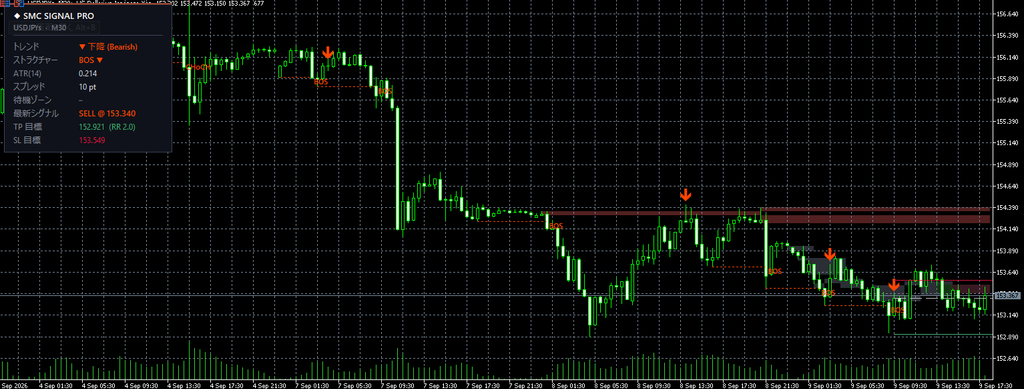
Smart Money Concepts looks at how price forms swing highs and lows, where the structure breaks, and which price zones may attract large orders. It also tracks imbalances left by rapid moves. A moving-average crossover or an overbought RSI reading alone does not capture this sequence.
Read the structure with BOS and CHoCH
The indicator identifies swing highs and lows over a configurable window, then checks whether price has clearly broken a swing level.
- BOS (Break of Structure) marks a break in the direction of the prevailing trend.
- CHoCH (Change of Character) marks a break that may signal a change in the previous market structure.
An upward break gives a bullish bias for subsequent setups. A downward break gives a bearish bias. Optional BOS and CHoCH lines show which level price broke.
Identify the order block before the break
When structure breaks, the indicator looks back at the candles immediately preceding the move for a potential order block. It draws a bullish zone for an upward break and a bearish zone for a downward break.
The breakout establishes the zone. The indicator then waits for price to return to it.
Wait for an order block retest
A retest becomes a potential entry when the zone and the direction of market structure agree.
- Bullish structure and a return to a bullish order block give a potential BUY.
- Bearish structure and a return to a bearish order block give a potential SELL.
If price breaks clearly through the order block and invalidates the zone, the indicator discards that setup.
Track fair value gaps (FVGs)
A fair value gap is a price imbalance left by a sharp move. Traders watch these areas because price may revisit them. SMC Signal Pro displays gaps that meet the minimum size you set and updates their status when price fills them.
Read confirmed arrows on closed candles
The indicator evaluates BUY and SELL arrows only after a candle closes. A confirmed arrow stays on its original candle, so you can use the same signal logic on a live chart and when reviewing past trades. The status of an FVG can still change as later candles fill it.
Interpret the entry, TP and SL levels
The indicator can draw all three levels when a signal appears. It places the suggested stop beyond the order block, with a buffer based on Average True Range (ATR). It calculates the target from the distance between entry and stop.
At the default InpRR of 2.0, the target is twice the stop distance from entry. These levels are guides. Consider the instrument’s volatility, the trading session and scheduled news when choosing your own exits.
Check the dashboard
- Current trend (Bullish or Bearish)
- Most recent BOS or CHoCH
- ATR (14) and current spread
- Order block awaiting a retest
- Latest BUY or SELL signal and suggested TP and SL
The dashboard brings these readings together, so you can see what the indicator is waiting for without tracing each chart object separately.
SMC Signal Pro settings
The input names below match the MT5 settings window. You can adjust them for your instrument, timeframe and trading style.
| Input | Default | What it controls |
|---|---|---|
| InpSwingLen | 5 | Number of bars on each side of a swing high or low. Lower values pick up smaller swings. Higher values emphasize broader structure. |
| InpOBLookback | 15 | Number of candles to search before a structure break for a potential order block. |
| InpMaxOB | 4 | Maximum number of order block zones displayed at once. |
| InpShowFVG | true | Show or hide fair value gaps. |
| InpFVGMinATR | 0.15 | Minimum gap width as a multiple of ATR. Lower values show more gaps. Higher values filter for larger imbalances. |
| InpMaxFVG | 6 | Maximum number of FVGs displayed at once. |
| InpShowTPSL | true | Show entry, TP and SL lines when a signal appears. |
| InpRR | 2.0 | Reward relative to risk. At 2.0, the target distance is twice the distance from entry to SL. |
| InpSLBufATR | 0.3 | Stop-loss buffer outside the order block, expressed as a multiple of ATR. |
| InpShowDash | true | Show or hide the dashboard. |
| InpDashPos | DASH_RIGHT | Place the dashboard at the top right or top left of the chart. |
| InpShowStruct | true | Show or hide BOS and CHoCH lines. |
| InpAlertPopup | true | Enable MT5 pop-up alerts when a signal appears. |
| InpAlertPush | false | Enable MT5 push notifications. Configure notifications in MT5 with your MetaQuotes ID first. |
Start with the defaults
Try the defaults on several charts before changing the swing length or the FVG threshold. A swing that stands out on one timeframe may be a minor fluctuation on another.
Short timeframes can produce more signals and more noise. Check the higher-timeframe trend, important highs and lows, and whether London or New York is in session.
How to get SMC Signal Pro
EA-Storage does not sell the indicator separately. It is free for traders who open an eligible Exness or XS cashback account through EA-Storage and meet the distribution conditions below. The account keeps its usual trading environment. Eligible trading volume can earn rebates that offset part of the trading costs.
Option 1. Exness cashback account
Follow the dedicated link in the Exness guide. After you trade on the eligible account, EA-Storage can verify its link to the programme before sending the indicator.
Option 2. XS cashback account
If you prefer XS, or Exness is unavailable where you live, check whether XS accepts residents of your country and whether the cashback offer applies to you. The guide includes the dedicated registration link and current terms.
Request the indicator on Discord
- Open an eligible Exness or XS cashback account through EA-Storage.
- Complete at least one trade on that account.
- Send your trading account number by Discord direct message and write “I’d like to request SMC Signal Pro.”
- EA-Storage verifies that your account is linked to its programme.
- Once verified, you receive SMC Signal Pro free of charge.
Discord ID: zzz_slp_88178
Already have an Exness or XS account? Send a direct message about linking your existing account. If your broker permits a separate registration with a different email address, use the dedicated link and confirm that the new account is linked.
How to join the EA-Storage Discord community
Using SMC Signal Pro in your trading routine
The indicator handles the chart work of marking BOS, CHoCH, order blocks and FVGs. You can follow a retest as it develops and see the entry and exit levels when a candle confirms a signal.
- Review the trend and the latest signal on the dashboard.
- Adjust the target multiple and stop buffer to suit the instrument.
- Use pop-up or push alerts to follow setups without watching every candle.
If you want to use SMC in discretionary trading, this reduces the time spent marking charts by hand. Choose the relevant guide below to check the conditions for receiving the indicator.
Risk notice. Forex and CFD trading can result in the loss of your capital. This article and SMC Signal Pro provide information, not investment advice or a guarantee of profit. You are responsible for decisions based on signals and suggested TP or SL levels. Check current broker and EA-Storage terms for regional availability, trading conditions and rebates.
Comments